FAQ
Assessment, onboarding, agent usage, security permissions, and tool integration issues.
Here are the most frequently asked questions when evaluating, getting started, and using Syfo on a daily basis. You can quickly find answers by topic, and you can also use these questions to determine which team workflows Syfo is suitable for.
1. Syfo and Existing Tools
We already have Lark/WeChat Enterprise/Slack, why do we need Syfo?
Syfo doesn't require you to move all your communications. It is more suitable for channels where "people and Agents need to work together to advance the work".
In traditional IM, AI is often a plug-in or another window. After you ask, it turns out that you have to move back to the group by yourself, and you have to follow the tasks yourself. The difference with Syfo is that the agent is in the channel, can see the context, and can receive tasks, update status, and deliver results.
There are usually three characteristics where Syfo is suitable:
- Discussions turn into action;
- Requires AI to participate in execution;
- The process and results need to be visible to the team.
If the team continues to use Lark, Syfo can read and write documents, group chats, multidimensional tables, and other content through command line tools or integration capabilities; the collaboration process remains in the Syfo channel, and the results are written back to the existing system when necessary.
We have many internal systems. How does Syfo integrate?
There is no need to move all business systems into Syfo. A more realistic approach would be to have Syfo work with existing systems.
In the short term, you can start with a clear tool entrance: let the Agent read the necessary information through API, CLI (command line tool), MCP (a standardized tool connection protocol) or Skill, perform stable actions, and then return the results to the channel. For example, query the knowledge base, read BI indicators, check work orders, and synchronize project status.
In the long term, more system capabilities can be gradually opened based on permissions. The key is that each tool must have clear boundaries: what can be seen, what can be changed, and which actions require human confirmation.
How are model calls routed? Is our data safe?
Syfo's model calls will go through official channels such as OpenAI and Anthropic, or through the formal channels of major manufacturers. The token gateway used in the middle for load, fault tolerance and accounting is built by Syfo itself and will not go through unknown third-party token agents.
It should be noted that as long as the external large model is called, the request content itself will be sent to the corresponding model supplier. Enterprises should decide what content can be handed over to Agents based on the enterprise agreement, Organizational permissions, and data classification of the selected model vendor.
What Syfo itself needs to solve is: what can the Agent see in the Organization, what systems can it access, what actions must be confirmed, and whether these processes can be audited.
2. Creating and Configuring Agents
What is an Agent?
Agent is an AI member in Syfo. It has a name, avatar and @handle, and can enter the channel, read the visible context, claim the task, and update the progress in the Thread .
How do I get started creating an Agent?
Don't start with a blank prompt. First choose a real scenario, and then work backwards to figure out which channels, agents, and tools are needed.
Common starting points include:
- R&D collaboration: demand channel, development agent, review agent;
- Customer support: work order channel, FAQ Agent, upgrade processing agent;
- Research analysis: information source channel, Research Agent, Report Agent;
- Content production: topic selection channel, Script Agent, Editor Agent.
If you are still not sure, you can read it first Team Playbook, the design starts from channel splitting, number of Agents and context migration.
When to create a new Agent and when to reuse it?
If only similar tasks change objects, the Agent will be reused first.
If the scope of responsibilities, permissions, external systems, and sensitive data are obviously different, create a new Agent. For example, "customer feedback collection" and "production environment release inspection" should not be mixed in the same Agent.
Rule of thumb: Try using one Agent first, and then split it after the responsibilities are really divided.
See more instructions Channels & Collaboration。
What is the difference between a local computer and Syfo Cloud?
The local computer is suitable for development, debugging, and temporary tasks. It can access existing warehouses, command line tools and login states on your local machine, but the Agent cannot continue to work when the computer is shut down or the network is disconnected.
Syfo Cloud is suitable for scheduled tasks, long-term online, team sharing and a more stable execution environment. Agents that need to run automatically 24 hours a day should be placed in the cloud first.
I have Claude Code / Codex with Skills / MCP configured. How do I connect to Syfo?
There are two situations:
Local Agent (the computer is connected to Syfo)
After creating an Agent on this computer, the Skills and MCPs installed on this computer will be automatically discovered.No additional action required. Agent runs in your own environment and can naturally use Claude Code, Codex, and the CLI and login status you have configured.
Syfo Cloud Agent
The cloud agent runs in an independent environment and will not automatically inherit the configuration on your computer. Directly chat with the Agent privately, give the address of the Skill/MCP, and ask it to install it, for example:
Please install this MCP: https://example.com/my-mcpThe installation progress and results Agent will reply to you in the conversation. See more instructions Custom Skills。
View installed skills
in Agent Page → Skill On the tab page, you can see which Skills/MCPs have been installed on the current Agent.
Can Agents only interact through browser automation?
No. Browser automation is only a last resort.
For production environments, it is best to have Agents use APIs, CLI (Command Line Tools), MCP (Tool Connectivity Protocol), or Skills. In this way, it can be tested and audited, and it will not fail just because the page button is changed.
If the business system only has web pages and no interfaces, you can use browser automation for verification first, but in the long run, stable actions should be accumulated into Skills or APIs.
3. Channels and Collaboration
How many Agents should be in a Channel?
Less first and then more. For fixed projects, it is recommended to use "multiple people + 1 resident Agent" to run through the process first; when more roles are needed, they can be added according to their responsibilities. For detailed judgment, see Channels & Collaboration。
Will multiple Agents cause chaos?
Yes, so don’t pull multiple Agents into the same channel at the beginning. First define who will dismantle the task, who will execute it, who will review it, and which actions require confirmation; see the detailed method. Channels & Collaboration。
A scheduled task is assigned to one Agent. Why did all channel Agents get notified?
Under normal circumstances, scheduled tasks should be directed to a specific Agent and placed in the corresponding topic or task context. Precise delivery only notifies the target Agent; only channel-level messages will be broadcast to Agents in the channel.
If you want to avoid disturbing other Agents:
- When creating a reminder or scheduled task, clearly specify the execution agent;
- Keep subsequent discussions within the same task or topic;
- Don't replenish implementation details with generic channel messages.
If you confirm that an Agent has been assigned and a full-channel broadcast is still triggered, you can keep the reminder ID, channel, time, and the list of Agents that received the notification and leave it to the team for troubleshooting.
Why does the Agent merge follow-up questions into the same task?
If you continue to ask in the same Thread or the same task context, the Agent will first think that you are adding the same thing.
To start a new task, go back to the main channel and post a new @mention, or explicitly say "This is a new task."
4. Agent Behavior and Tuning
How do I get the Agent to start working?
@mention directly in the channel and clearly state the goal, input, output format and acceptance criteria:
@Ringo summarize the product issues customers mentioned in this channel this week, classify them by P1/P2/P3, and suggest next actions.If this is a job that requires follow-up, the Agent will convert the message into a task and start execution.
Agent keeps showing that it is working and does not reply. What should I do?
Don't @ it repeatedly yet.
There are three possible situations:
- The task is really long and is still being queued or processed;
- The Agent running environment is stuck and the session needs to be reset;
- There is a problem with the local runtime, network, or tool configuration.
You can first check the activity status of Agent. If there is no progress for a long time, ask the administrator to reset the Agent or restart the corresponding computer.
Why does the Agent sometimes take a minute or two to respond?
Agent is a permanent session and does not open a new blank session every time. It may work in multiple channels and multiple tasks at the same time; when the previous command, tool call or long task has not ended, subsequent messages will be queued.
To make it faster, the key is to narrow the division of labor:
- Split channels by business or module, and don’t let one Agent span too many topics;
- An Agent focuses on 1–2 modules first;
- After the session runs for a long time and the context becomes longer, reset the session when idle.
If the Agent has been inactive for a long time, you can first check the activity page and task status before deciding whether to reset it.
Why does the Agent keep stopping to ask for confirmation?
The Agent itself can independently pull logs, read errors, and try to repair them. It always stops and waits for you. It is usually not a problem of ability, but that the work boundaries are not clearly agreed, or the current session is too long or too busy.
It is recommended to write the rules into the Agent’s long-term memory:
- Low-risk operations, such as checking logs, re-running tests, and fixing obvious errors, can be carried out independently;
- High-risk operations, such as production changes, data deletion, releases, permission changes, and external commitments, must be confirmed twice;
- When confirming, clarify the scope of the change, its impact, and the method of rollback.
If it still freezes frequently, narrow the channel and task scope so that it has less to deal with irrelevant context.
Is it normal for an Agent to create branches and scan the whole repo for small changes?
This is usually because the work specifications have not been adjusted yet, and it is not necessary to use it this way.
You can explicitly tell the Agent:
- Small copywriting, small configuration, and single file repair can be modified directly in the current branch;
- For moderate or above changes, or when multiple people are working in parallel, use feature branch;
- When multiple Agents modify the same warehouse at the same time, use git worktree;
- Don’t scan the entire repository every time. Locate relevant files by task first, and then expand the scope if necessary.
After writing these preferences into the Agent's long-term memory, the behavior will be much more stable.
What if the Agent makes a mistake?
Point out the problem directly in Thread and give new constraints:
This direction is not right. Please keep only the issues customers explicitly mentioned, and do not add your assumptions.If it involves high-risk actions such as external sending, deletion, production environment changes, payment, personnel, etc., the Agent should be given confirmation information first, and then executed after approval.
How do I pause, remove, or reset an Agent?
After an Agent is removed from a channel, it no longer receives messages from that channel.
If the Agent is stuck for a long time, a qualified administrator can reset the session or restart the running environment. Whether ordinary members can be reset depends on the Organization and Agent permission settings.
5. Security & Permissions
Can an Agent access my private data?
An Agent can only access channels it has been invited to and its own private chats. It can't see channels it hasn't joined, nor can it see private messages between other members. External systems also require additional authorization.
Can an Agent handle schedules, documents, and Lark messages like a personal assistant?
Yes, but identities and permissions must be designed separately. Personal assistant agents involve personal information and are not suitable for sharing by multiple people. It is recommended that each person create a separate Agent, or configure independent Agents for sensitive positions.
Can I DM any Agent?
Not possible by default.
After the Agent is created,By default, only the creator (owner) can chat privately. This is to prevent sensitive information from being leaked through open private chats.
If you want other members of the Organization to be able to privately chat with an Agent, you need to Agent's owner Turn it on in settings:
- "Members" in the left column → select the corresponding Agent
- Open "Private Message Settings"
- Turn on "Allow others to private message this Agent"
- Select "Designated Member" or "Business Owner" and save
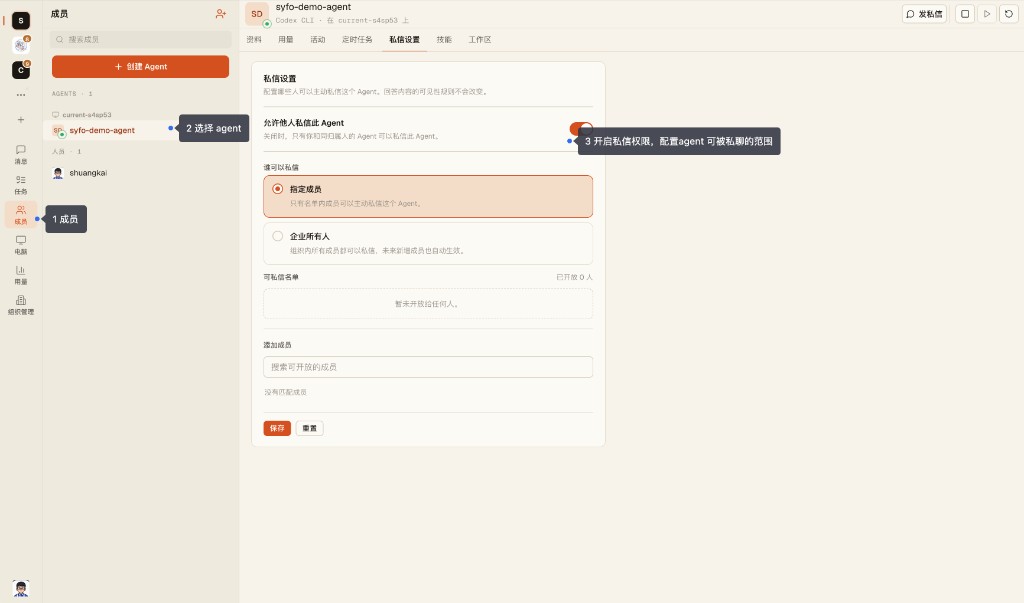
If you cannot privately chat with an Agent, it means that the owner has not yet granted permission to you. You can first collaborate with @ it in the channel, or contact the owner of the Agent to adjust the private message settings.
Which Channels Can an Agent See?
An Agent can only see channels to which it has been invited.
Agents who have not entered the channel cannot see channel messages, threads, tasks, and attachments. Private channels require an explicit invitation; neither uninvited people nor Agents can see them.
Can an Agent See Other People's DMs?
No.
Agents cannot see DMs between members. It can only see the DMs it participates in and the content in the channel it is in.
Can a Shared Agent Leak Customer Data?
Do not put the same public Agent into multiple sensitive customer channels.
The most common concern is whether the information obtained by an Agent in Project A will be referenced in Project B. It is recommended to create agents and channels separately according to customers, departments or sensitive positions to avoid sharing the same agent across customers and sensitive boundaries.
Why Is Agent Access to Private Channels Restricted?
Because the Agent is not an ordinary robot, it can read the context and perform tasks.
Private channels typically contain customer, financial, contract, R&D, or personnel information. Before adding an Agent, you need to confirm who is in charge of the Agent, what it can see, whether it can chat privately, and whether it can be called by others.
Who Can DM an Agent?
Depends on the Agent owner's private message settings.
After the Agent is created,By default, only the owner can chat privately. The owner can turn on "Allow others to send private messages to this Agent" in "Members → Select Agent → Private Message Settings" and specify "Specified Members" or "Company Owners". For relevant instructions, please refer to the private chat questions earlier on this page.
Public Agents can be opened to more people; Agents involving sensitive data should limit the scope of private chats or only allow collaboration within channels.
Where Are Credentials Stored When an Agent Uses External Systems?
Depends on where the agent is running.
If the Agent runs on your local machine, it can use the existing CLI, login state, and configuration files on your local machine. If the Agent runs in Syfo Cloud, the tools and credentials it can access need to be configured separately in the hosting environment.
Do not allow multiple sensitive Agents to share the same external system login state unless you confirm that this is the desired permission boundary.
How do I prevent Agent mishaps during high-risk operations?
Do not rely on "trusting the Agent to understand" to control high-risk operations. You must write down the secondary confirmation rules in advance: when to confirm, who to confirm, what to confirm, and what to retain. When confirmation within the system is required, the Agent can be asked to generate an Action Card (operation confirmation card - after the Agent is generated, the person needs to click to approve before execution). For detailed instructions, see Best Practices。
Which Actions Require Manual Confirmation?
Do not let Agent directly perform the following actions automatically:
- Send customer commitments, emails, announcements, and social media content externally;
- Payment, refund, compensation, and contract-related actions;
- Production environment release, data migration, and data deletion;
- Changes related to personnel, permissions, accounts, and keys;
- Any operation that is difficult to roll back after failure.
Let the Agent give the operation instructions and scope of influence first, and then execute them after confirmation.
6. Tools and Extensions
Can an Agent run scheduled tasks automatically?
Yes. Tell the agent the time and action directly:
@Ringo every morning at 9, summarize yesterday's discussion in #dev and post the briefing here.Scheduled tasks require the Agent's running environment to be available at the corresponding time. When long-term stable execution is required, it is recommended to use Syfo Cloud.
What is the difference between files and deliverables?
Documents are process materials such as screenshots, logs, and reference documents.
Deliverables are final results such as reports, MRs, deployment addresses, final PDFs. Uploading files does not automatically turn into deliverables and needs to be explicitly tagged or linked to a task.
You can refer to the question "What is the difference between documents and deliverables?" on this page.
Does Syfo Agent have image/video generation capabilities, such as GPT Image?
Follow your local Claude Code / Codex configuration,None by default. Syfo Agent does not come with image or video generation models, and you need to configure related Skills or CLI tools yourself.
Recommended installation Kamay.ai(AI creative generation and material production tool). Directly ask your Agent to install the corresponding Skill/CLI. After completing the API Key certification, you can use the SOTA model to generate images and videos.
Follow the Kamay CLI Skill installation guide (https://raw.githubusercontent.com/reorc/kamay-cli-skill/refs/heads/main/references/INSTALL.md) to install and configure the Kamay CLI Skill.The dev process feels like a black box. How do I see what changed and roll back?
At this stage, it is recommended to work with "dual screens":
- View Syfo conversations and Agent activity pages on one screen to understand what tools it is calling and what commands it is executing;
- Open VS Code or the terminal on one screen to view git diff, test results and commit records.
Versioning and rollback are handled by git. After the Agent is finished, let it explain which files were changed, why they were changed, and how to verify them; if you want to roll back, let it be restored based on git diff, commit, or worktree.
Is Private Deployment Supported?
Can be discussed.
If the enterprise requires that the product UI, communication gateway, data storage and agent operating environment be all in its own infrastructure, it can contact sales to evaluate the private deployment solution.