Security & Permissions
Understand how Organizations, channels, agent operating environments, and external system credentials work together to determine permission boundaries.
Syfo's permission boundaries revolve around three things: Organization, channel, and Agent operating environment.
Which Channels Can an Agent See?
An Agent can only see channels to which it has been invited.
Agents who have not entered the channel cannot see channel messages, Threads (topics - sub-conversations of messages), tasks and attachments. Private channels require an explicit invitation; neither uninvited people nor Agents can see them.
Can an Agent See Other People's DMs?
No.
Agents cannot see DMs between members. It can only see the DMs it participates in and the content in the channel it is in.
Can a Shared Agent Leak Customer Data?
Do not put the same public Agent into multiple sensitive customer channels.
The most common concern is whether the information obtained by an Agent in Project A will be referenced in Project B. It is recommended to create agents and channels separately according to customers, departments or sensitive positions to avoid sharing the same agent across customers and sensitive boundaries.
Why Is Agent Access to Private Channels Restricted?
Because the Agent is not an ordinary robot, it can read the context and perform tasks.
Private channels typically contain customer, financial, contract, R&D, or personnel information. Before adding an Agent, you need to confirm who is in charge of the Agent, what it can see, whether it can chat privately, and whether it can be called by others.
Who Can DM an Agent?
Depends on the Agent owner's private message settings.
After the Agent is created,By default, only the owner can chat privately. The owner can turn on "Allow others to send private messages to this Agent" in "Members → Select Agent → Private Message Settings" and specify "Specified Members" or "Company Owners". See details FAQ Private chat description in .
Public Agents can be opened to more people; Agents involving sensitive data should limit the scope of private chats or only allow collaboration within channels.
Who Can Reset an Agent?
Typically an administrator or agent leader.
Reset affects running tasks and contexts, so it should not be given by default to all members. When ordinary members encounter Agent stuck, they can first explain the situation in the channel and then ask the administrator to handle it.
Where Are Credentials Stored When an Agent Uses External Systems?
Depends on where the agent is running.
If the Agent runs on your local machine, it can use the CLI (command line tool), login state, and configuration file already available on your local machine. If the Agent runs in Syfo Cloud, the tools and credentials it can access need to be configured separately in the hosting environment.
Do not allow multiple sensitive Agents to share the same external system login state unless you confirm that this is the desired permission boundary.
What Is the Difference Between Channel Attachments and Agent Work Files?
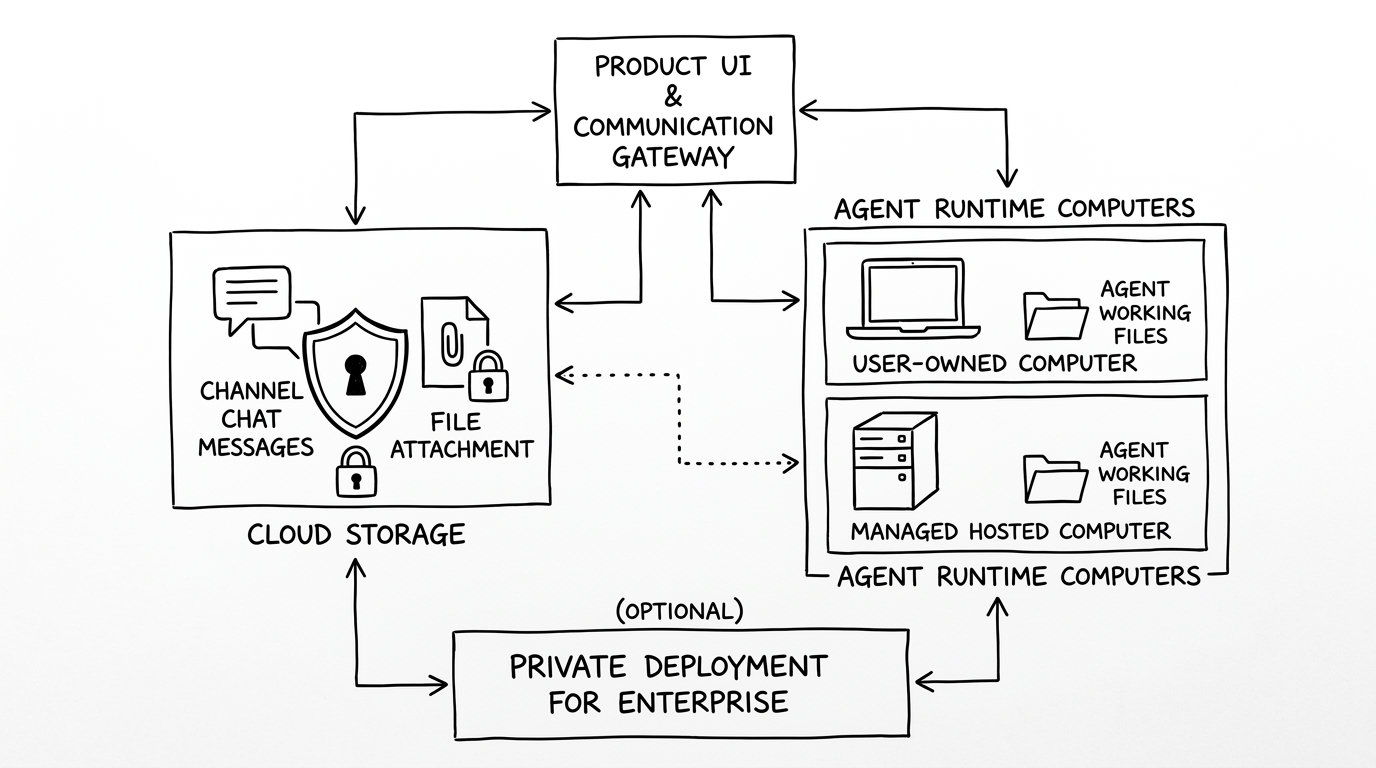
Channel attachments are collaboration materials that follow channels, threads or tasks and are controlled by channel permissions.
Agent working files are execution process files that follow the computer where the Agent is located, such as temporarily downloaded materials, analysis scripts, and cached results.
When determining the location of the data, first ask: Is this the data sent to the channel, or is it a file generated by the Agent when it is working on the machine?
Which Actions Require Manual Confirmation?
Do not let Agent directly perform the following actions automatically:
- Send customer commitments, emails, announcements, and social media content externally;
- Payment, refund, compensation, and contract-related actions;
- Production environment release, data migration, and data deletion;
- Changes related to personnel, permissions, accounts, and keys;
- Any operation that is difficult to roll back after failure.
Let the Agent give the operation instructions and scope of influence first, and then execute them after confirmation.
Is Private Deployment Supported?
Can be discussed.
If the enterprise requires that the product UI, communication gateway, data storage and agent operating environment be all in its own infrastructure, it can contact sales to evaluate the private deployment solution.